Ontology Atlas is an open-source app that keeps what your code builds, and why, as Markdown in your repository. Claude Code and Codex read the same folder over MCP, and after a commit the map marks the concepts to recheck.
Free · No sign-up · Checked by Apple for malware
37s from one take of the app window. Nothing is cut or sped up, and there is no sound.
- Version
- v2.2.2 · Nov 17, 2026
- Requires
- macOS 12 or later · Apple Silicon
- DMG
- 84.5 MB
- SHA-256
- 92221ea2…96241b15
- Changelog
- What changed in v2.2.2
40MCP tools
An agent calls them to read the map and propose a change.
96concepts
Atlas maps its own code too, in this repository's docs/ontology/.
242relations
Between those concepts, written as names in the info block at the top of each file.
How Markdown becomes the map
One concept is one .md file
Your ontology is plain Markdown files in your repository.
Its top lines become points and lines
The few lines at the top of each file become the map's points and lines.
Files take their places and connect
Every concept settles beside the concept that holds it, and the 242 relations written in the files become lines.
One map, read by you and your agents
This repository's real map: 96 concepts and 242 relations.
The Harness tab: your repository's agent setup
One scan gathers your agent setup
One read collects CLAUDE.md, AGENTS.md, rules, skills, subagents, hooks, scripts and CI workflows, and sorts them into what the agent reads, what stops it before it acts and what checks its work afterwards.
Filter by agent tool
Pick one tool the scan found, such as Claude Code or Codex, and every list and count narrows to the files that tool reads.
It finds a missing hook script
A hook script a config names but the disk lacks, or an AGENTS.md over Codex's default 32 KiB limit, shows as one line that takes you to the place to fix.
Tags Claude and Codex copies that differ
A skill or subagent whose Claude Code and Codex copies differ is tagged, and both copies are shown side by side. Atlas only reads the repository.
With your coding agent
Your agent reads it, a commit marks it, you allow it
The map is Markdown in your repository, so the same folder works at three moments.
Your agent reads the map before the code
Claude Code and Codex ask the folder over MCP what a concept is, what it contains and depends on, and which file holds it.
After a commit, the concepts to recheck are marked
Each concept names the file it describes. When a commit changes that file after the concept was last written, the map marks the concept in amber.
Nothing is written until you allow it
In the app's chat, an agent's change to the map waits as a card. Allow it once or deny it. What gets written is Markdown in the folder, never your code.
The concept and file names are from this repository's own ontology. The commit and the proposal are examples.
Screens
One folder, read on every screen
The same Markdown folder opens as a screen for each job in the app. Press a name to see that screen; Map opens live in this browser.
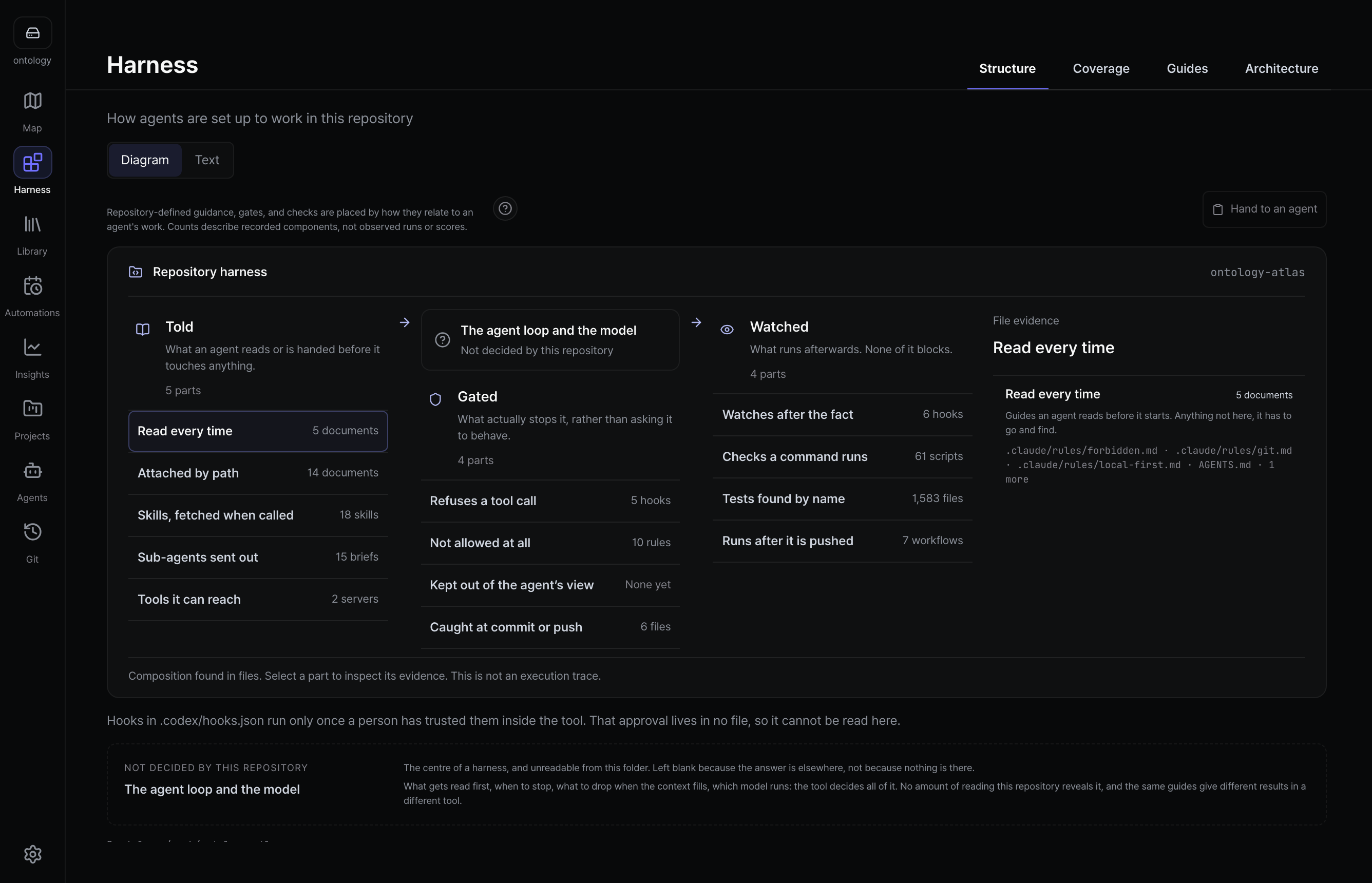


This repository's own agent setup, read from its files: the instructions agents get, the hooks that stop them, and the checks that run afterwards. Captured from the app.
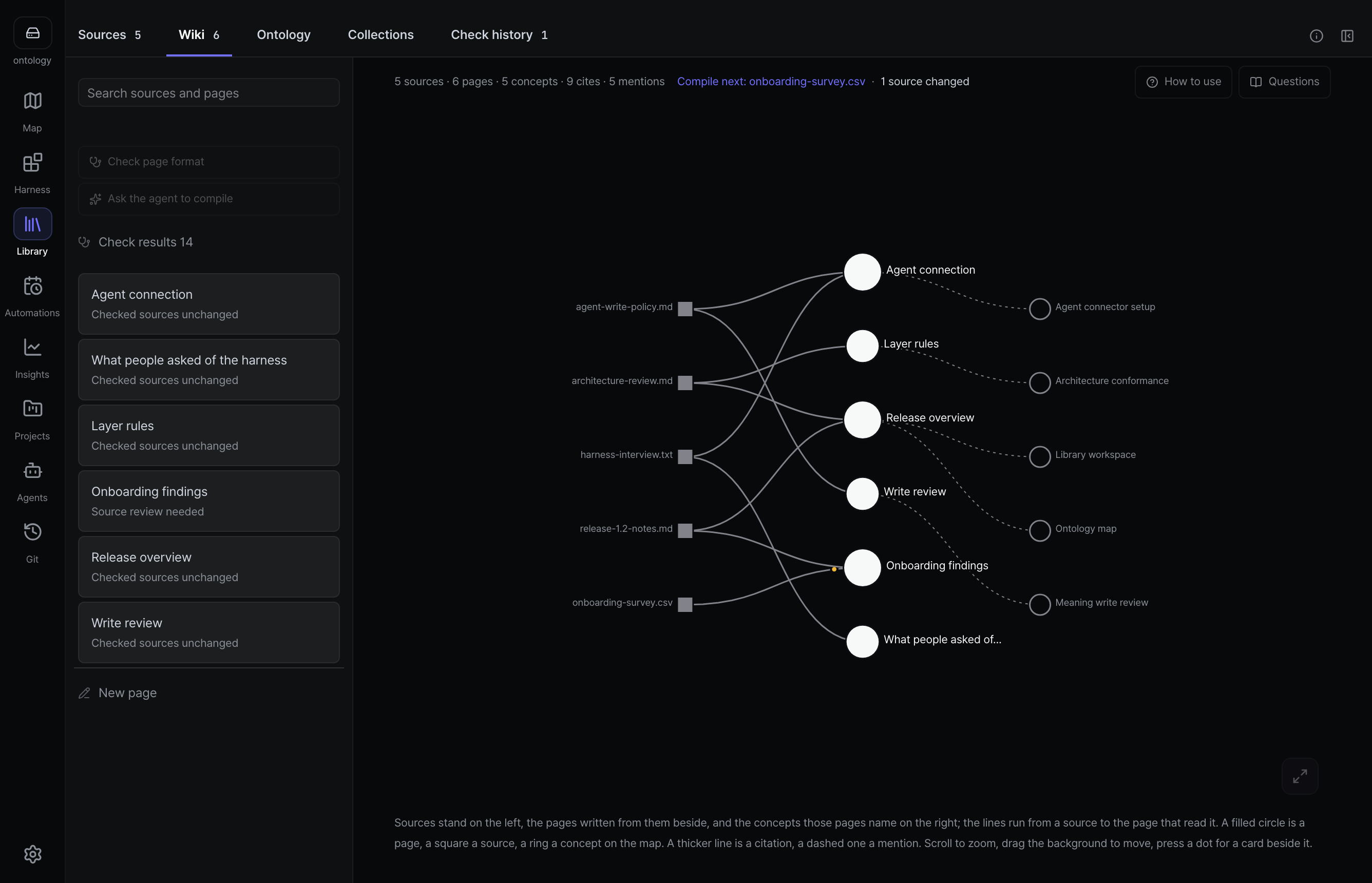
Open HarnessA sample library of five sources and six wiki pages beside this repository's ontology. The page whose source changed is marked before you open it. Captured from the app.
Open LibraryThe docs folder of this repository, read in place: a file list on the left, FEATURES.md open on the right. Nothing is copied or edited. Captured from the app.
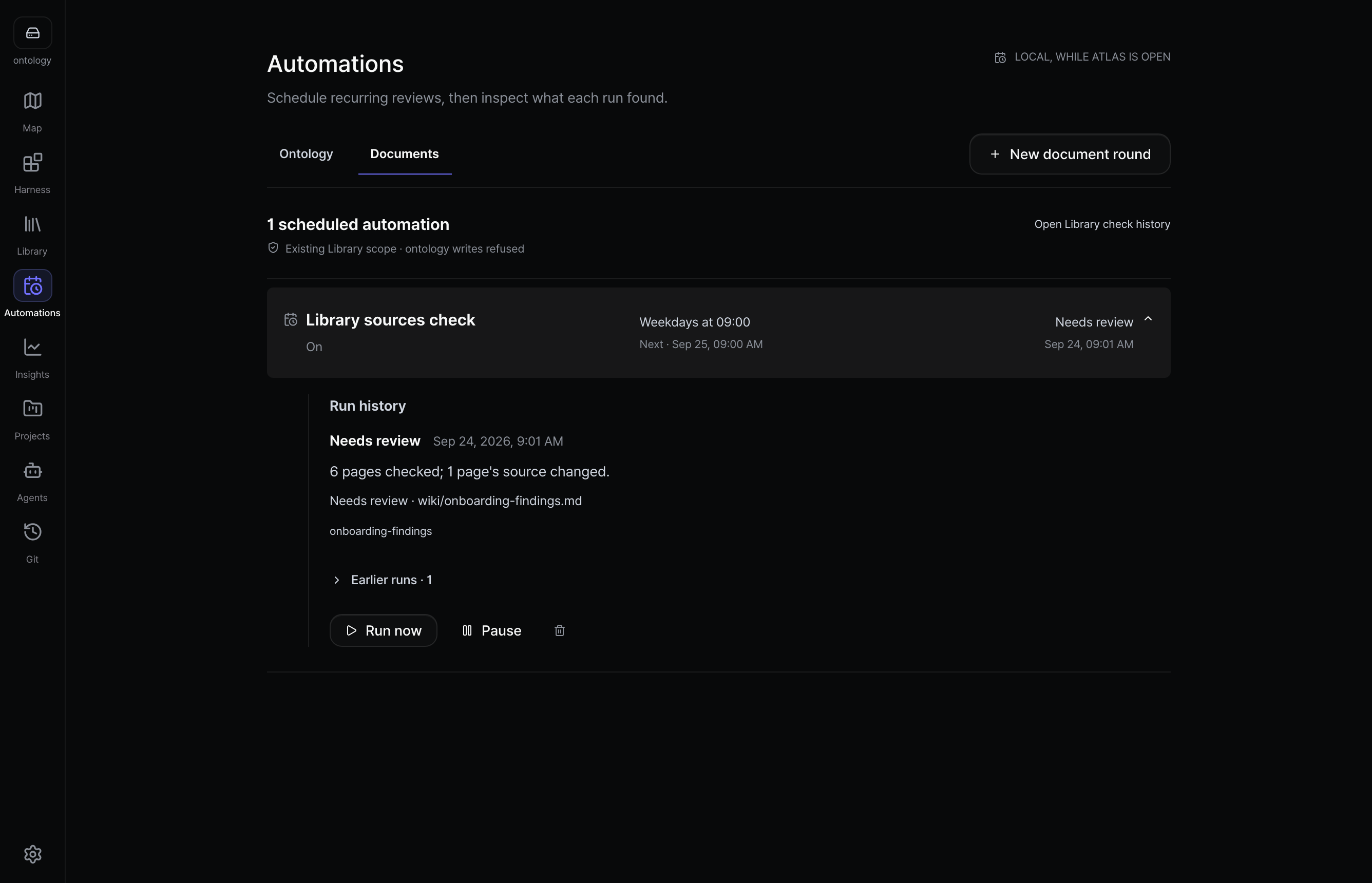
Open PlanningA weekday check of that sample library, and the run that found one wiki page's source had changed. Captured from the app.
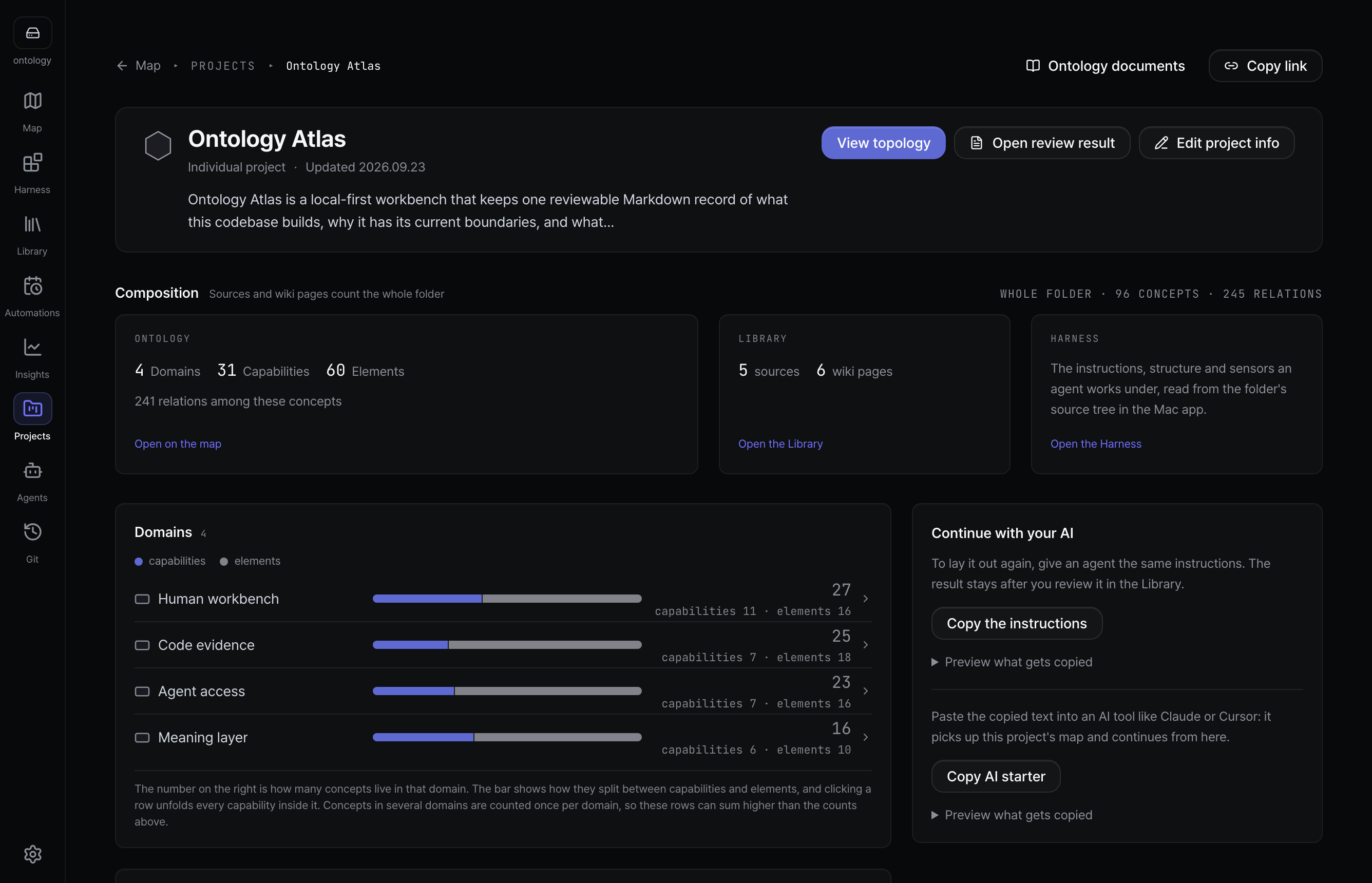
Open AutomationsOntology Atlas on one page: its domains, concepts, library and harness together. Captured from the app.
Open ProjectsOne day of this repository's history: the changes merged that day, grouped by the area they touched. Captured from the app.
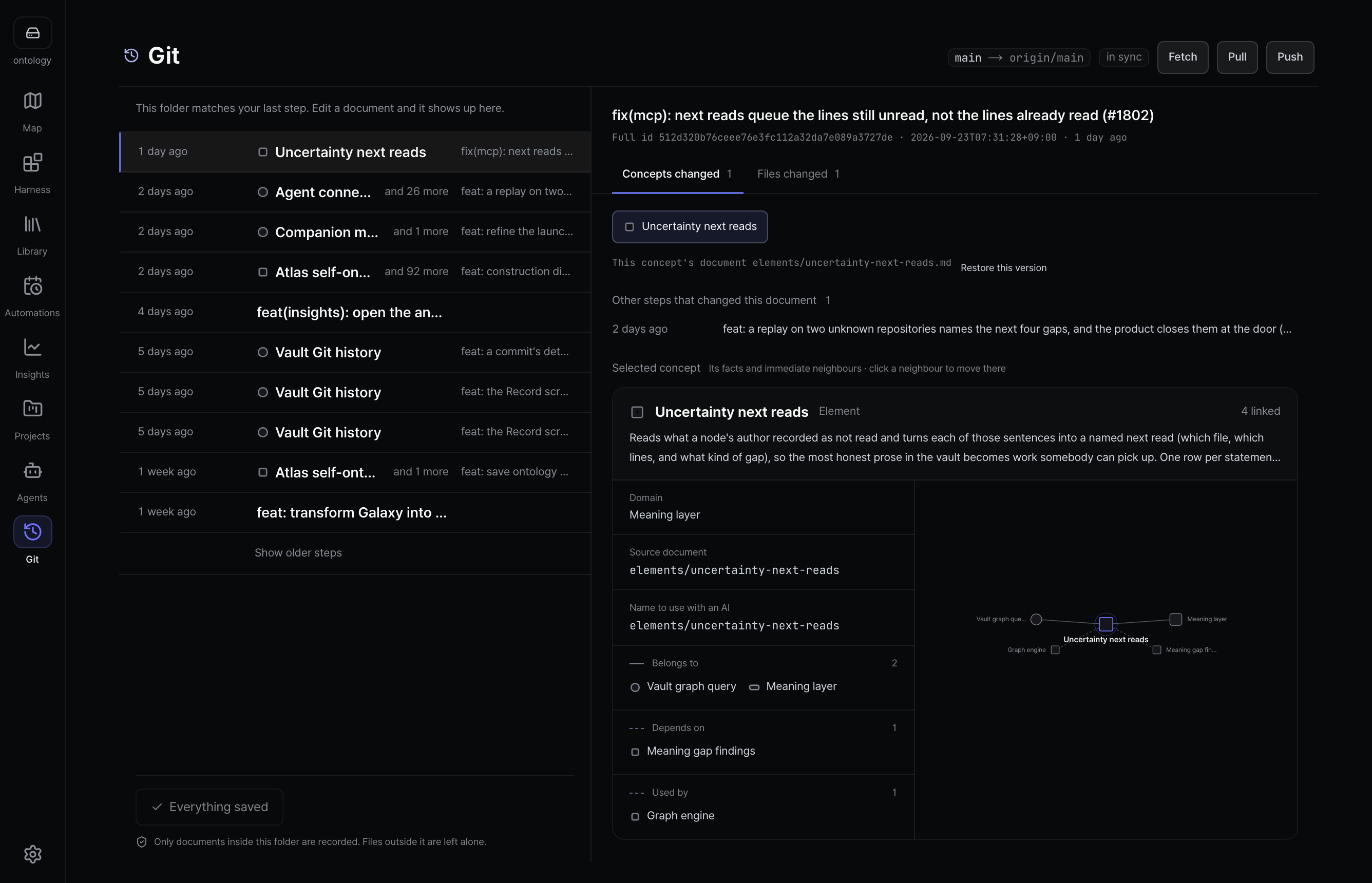
Open ChangesThe Git history of this repository's ontology folder, read as the concepts each commit changed. Captured from the app.
Open GitAfter you install
Three steps to your own map
Open your project's folder
Atlas reads the Markdown already there, or starts an atlas/ folder in your repository, and shows the path before it writes anything.
Let your agent draft the map
The first card offers to have your coding agent read the code and propose the concepts it finds. Nothing is written until you allow it.
Connect the agent you code with
In Agents › MCP, press Connect for Claude Code or Codex and restart it. From then on it reads the same folder while it works.
Open source
Every line is public
The app, the MCP server and the CLI sit in one repository. Read it, build it yourself, send a fix.
- Stars
- 165
- Forks
- 24
- License
- MIT
Counts read from GitHub on Nov 17, 2026.
Star it on GitHub- src/Screens and the map renderer
- src-tauri/The macOS and Windows app
- mcp/The MCP server agents call
- cli/The command-line tool
- docs/ontology/This repository's own ontology
Questions
Before you install
Does my code leave my computer?
Atlas has no account and no backend of its own. The map is read and written in a folder on your computer. A coding agent you connect talks to its own provider, as it already does.
Your computerRepository folderreads and writesAtlas appMCPCoding agentthe agent's own trafficAgent's providerNo Atlas backendHow is it different from a code graph or a code search index?
Those are computed from the code. Atlas records what the code is for and why, which the code alone cannot say, and you review every change to that record as a Markdown diff. A line on the map is a declared relationship, not proof of runtime impact.
Pick a folder and start.
Free · No sign-up · Checked by Apple for malware
- Version
- v2.2.2 · Nov 17, 2026
- Requires
- macOS 12 or later · Apple Silicon
- DMG
- 84.5 MB
- SHA-256
- 92221ea2…96241b15
Questions or ideas? I read every message. DM me on LinkedIn